Telegram Channel
On your phone, visit BotFather from a browser. Click "SEND MESSAGE" and you will jump to the Telegram application. Click "Start" at the bottom to talk to @BotFather.
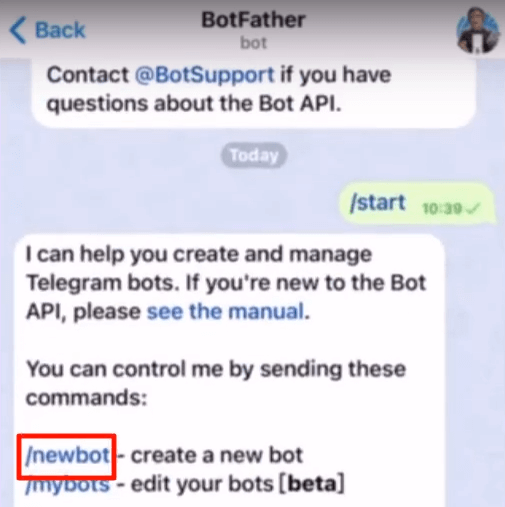
Send "/newbot", then a username for your bot. You will get a token like this:
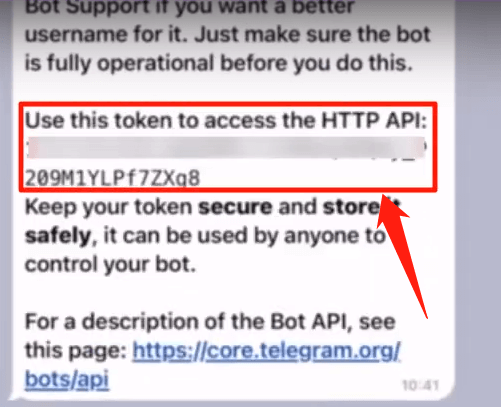
Copy the token and back to UChat.
In UChat, click "Add New Telegram Bot" and put your token in the pop-up window. Finally, click "Create Flow" and there you go!
Flip the status to stop/start the automation and click the red x to remove the connection (your flow will be still in "All Bots")
#Talk to Telegram Bot
2 ways:
Click the URL link above.
Use the preview button in your flow.
Related Articles
FAQ & Common Errors for Telegram Channel
Error: “Forbidden: user is deactivated” You're trying to perform an action on a user account that has been deactivated or deleted by Telegram.Omni Channel
Omni Channel How to create a chatbot in omnichannel How to connect channels to omnichannel How to create an omnichannel flow Use conditions to determine where the user is coming from How to determine which channels support which features? Omnichannel ...Why Telegram User Menu is not showing?
While creating a Telegram user menu, the “Command” field can only have lower case characters that will ensure the user menu is visible. With upper case letters, the user menu will not be displayed in the chatbot but user menu commands will still be ...Viber Channel
How to Create Viber Chatbot Viber is another popular messaging app. In this article we will discuss how to link Viber Bot with OCP Viber Channel. Viber channel can be accessed from the left hand side of the screen where all the channels are listed. ...SMS Channel
Welcome to the world of SMS chatbots! These bots provide a direct and efficient way to communicate with your audience via text messages, opening doors to enhanced customer engagement and streamlined communication. Introduction to SMS Channels: ...